
JJ55 Register – Create a New Account and Get Started
JJ55 Register is for new users who want to create an account and access the platform through their preferred device. The signup process is simple when you use an active mobile number or email address and enter your details carefully. A personal account helps you keep your login information, profile settings, and verification details in one place. Use the correct information from the start so you can avoid problems when recovering your account later.
Before completing the form, make sure you are using the JJ55 website or app from a trusted source. Registration usually includes creating a password, confirming your contact details, and completing an OTP verification step. It only takes a few minutes when your phone number is active and your internet connection is stable. This guide explains the complete process and helps you understand what to do after your account is ready.
How to Register on JJ55?
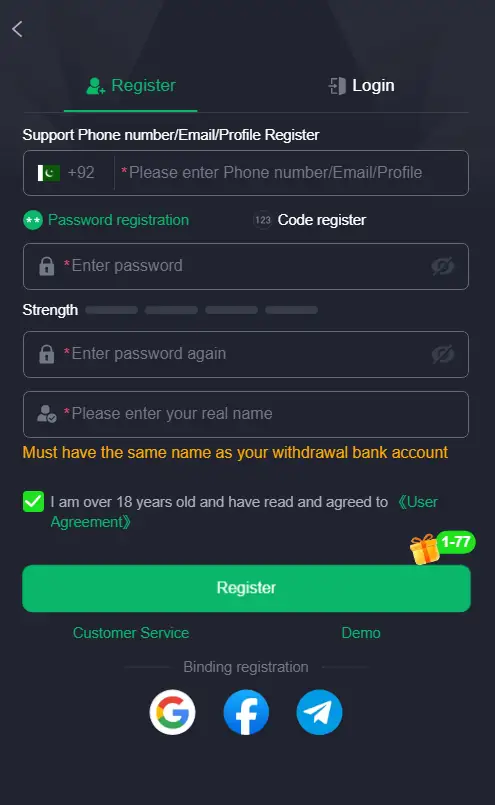
The account creation process may look slightly different depending on the device you use, but the basic information remains the same. You should use your own mobile number or email address because it may be needed for future verification. Create a password that is easy for you to remember but hard for others to guess. Complete each field slowly instead of rushing through the form.
Register on Android
Android users can create a new account through the installed application.
- Open the JJ55 app on your Android phone.
- Tap the Register, Sign Up, or Create Account option.
- Enter your active mobile number or email address.
- Create a secure password for the account.
- Re-enter the password to confirm it.
- Enter the OTP sent to your number or email.
- Read the available terms before continuing.
- Tap the final registration button to complete the process.
After the signup is successful, you can use the same details to access your account anytime. Keep the application updated so its forms and security settings work smoothly. If the OTP screen does not load, check your mobile signal and internet connection before trying again. Avoid using modified APK files or links sent by unknown social media accounts.
Register on iPhone and iPad
iPhone and iPad users can normally create an account through the browser version.
- Open Safari on your iPhone or iPad.
- Visit the JJ55.pk website.
- Find the Register button on the homepage.
- Enter your mobile number or email address.
- Choose a strong password and confirm it.
- Request the verification code if needed.
- Enter the OTP carefully in the required field.
- Submit the form and wait for account confirmation.
Safari is usually the simplest choice because it is already available on Apple devices. You can add the website to your home screen after registration for easier access in the future. Do not register through links shared in suspicious WhatsApp groups, Telegram channels, or social media comments. Always confirm that you are on the correct website before submitting personal information.
Register Through a PC or Laptop
A computer can be useful for users who prefer a larger display while filling out forms.
- Open Chrome, Edge, Firefox, or another updated browser.
- Go to the JJ55.pk website.
- Click the Register option from the main page.
- Add your active phone number or email address.
- Create a new password for your profile.
- Complete OTP verification if the page requests it.
- Review your details once before submitting.
- Wait for the registration confirmation message.
Using a personal computer is better than registering through a public system. Internet cafés, office computers, and shared laptops can store your password or browser history without your knowledge. Log out after every session when using a device that is not yours. Do not allow the browser to save your password on a shared PC.
Pick Details That You Can Access Later
The information you use during JJ55 register process matters more than many new users realize. Your phone number and email address can be needed for OTP verification, password recovery, security notices, and account-related help. Use a number that is active and remains under your control. Using a friend’s number may seem convenient at first, but it can create serious problems if you lose access later.
Your email address should also be correct and easy for you to open. Check the spelling before submitting the form because even one wrong letter can stop verification messages from arriving. Keep a record of the number or email connected to your JJ 55 account in a secure place. Accurate information gives you more control over your profile.
Build a Password That Is Not Easy to Guess
A password is your first line of protection, so do not choose something obvious. Avoid using your name, phone number, birth year, or simple combinations such as 123456. These are easy to guess and can put your account at risk. A stronger password makes unauthorized access more difficult.
A better password usually includes:
- Uppercase letters
- Lowercase letters
- Numbers
- Symbols, where accepted
- At least eight characters
- A mix that is not connected to your personal information
Do not reuse the password from your email, banking application, or main social media account. Keep it private and do not send it to anyone through chat. If you think another person has seen your password, change it as soon as possible. Good password habits help protect your account from unnecessary risk.
Why Mobile Verification Is Part of Signup
OTP verification is used to confirm that the phone number or email address belongs to you. After submitting your registration details, a temporary code may be sent through SMS or email. You need to enter that code on the registration screen to complete the verification step. This helps reduce incorrect or duplicate registrations.
Follow these simple OTP rules:
- Enter the code only on the JJ55 register page.
- Never forward the OTP to another person.
- Do not share screenshots showing the code.
- Request a fresh code if the previous one expires.
- Check your signal or inbox when the code does not arrive.
- Use the same mobile number that you entered on the form.
An OTP is private information, just like your password. No genuine support representative should ask you to share your code in a chat. Be careful when someone claims that they need the OTP to activate a bonus, fix a problem, or complete your account. Keep verification codes to yourself.
What to Check Before You Submit the Form
Taking one extra minute before pressing the final button on the JJ55 Game register form can save a lot of trouble later. Small typing mistakes in your number, email, or password may stop you from logging in properly. Review all fields carefully and make sure they match the information you want to use long term. A correct signup gives you a smoother start on the platform.
Before submitting, check the following:
- Your phone number has the right digits.
- Your email address has no spelling mistake.
- Both password fields are identical.
- You can receive an SMS or email code.
- Your internet connection is working properly.
- You have read the available JJ55 registration rules.
- You are using your own details, not someone else’s.
Do not create several accounts because one attempt takes too long. First, wait for the form to respond or check whether your number is already linked with an existing profile. Multiple accounts can create confusion during future verification. One properly managed JJ55 account is usually the better option.
Your First Actions After Account Creation
Once your new account is active, take a little time to understand the dashboard instead of moving quickly into every section. Review your profile page and check whether the phone number or email address appears correctly. Look for account settings, help options, and password controls so you know where they are when needed. This makes future use more convenient.
You can normally explore areas such as:
- Profile and basic account settings
- Password update options
- Platform notifications
- Customer support or live chat
- Game categories
- Referral tools, where available
- Payment-related sections, where applicable
Keep your information private while exploring these areas. Do not share screenshots that show account numbers, verification codes, passwords, or financial details. Read instructions carefully before using any money-related feature. Online casino-style games involve risk, so always use the platform responsibly and within your own limits.
Problems That May Appear During JJ55 Register Process
Some registration issues happen because of temporary internet problems, incorrect details, or delayed verification messages. Most can be solved with a few basic checks before contacting support. Stay calm and avoid opening multiple forms at the same time. Trying again carefully is often enough.
| Problem During Signup | Suggested Action |
|---|---|
| OTP has not arrived | Check your network, wait a few minutes, then request a new code. |
| Number is already in use | Try logging in or use password recovery for the existing account. |
| Password is rejected | Add letters, numbers, and symbols to make it stronger. |
| Form does not submit | Refresh the page and confirm your internet is stable. |
| App closes unexpectedly | Restart your phone and update the app. |
| Website is loading slowly | Clear browser cache or use another updated browser. |
| Email is not accepted | Check spelling and make sure the email is active. |
Avoid creating a second account when you face one of these issues. Duplicate profiles can make it harder to manage login details and may delay future support requests. Use the recovery option when you already have an account but cannot remember the password. Contact the support section only after checking the basic steps above.
Keep Your New Profile Under Your Control
Creating an account is only the beginning. How you manage it afterward matters just as much. Use your own phone lock, fingerprint, or PIN so other people cannot open your browser or application easily. Log out whenever you use a shared device.
For safer account use:
- Keep your password private.
- Never share OTP codes.
- Do not click suspicious registration or login links.
- Update your browser or app when needed.
- Avoid saving passwords on public computers.
- Change your password if you notice unusual activity.
- Use only the correct JJ55.pk website or app access point.
This platform is intended for adults aged 18 or above. Treat gaming as entertainment, not as a guaranteed earning method. Set your own limits and avoid spending more than you can comfortably afford. Responsible use helps you maintain better control of your activity.
Questions New Users Often Ask
Can I register with only a phone number?
Yes, you can usually create an account with an active mobile number. You may need to verify that number through an OTP before the process is completed.
Can I sign up to JJ55 with an email address?
In many cases, an email address can also be used. Choose an email account that you can access later for password recovery and account notices.
What happens if my number is already registered?
Try using the Login option first. If you cannot remember the password, use the password recovery feature instead of making another account.
Why is the verification code not arriving?
Your mobile signal, internet connection, or a typing mistake in the number may be causing the delay. Wait briefly, check the details, and request another code.
Should I share my signup details with an agent?
No. Keep your password, OTP, and recovery information private. These details should never be shared with another person.
Start With the Right Account Setup
JJ55 Register gives new users a straightforward path to create an account through Android, iPhone, iPad, PC, or laptop. Enter your personal details carefully, complete verification only through the proper page, and use a password that protects your profile. These small steps can prevent many common account problems.
Once your profile is ready, keep your login details safe and use only trusted access methods. A well-managed account gives you a more secure and organized start on the platform.